Selasa, 15 Januari 2013
File Manager On Blackberry 10
16 GB internal storage + up to 32 GB external storage (micro SD) + 5 - 50 GB online storage from Box + 2.5 - 48 GB online storage from Dropbox. And The result is you have an extravagant storage at your Blackberry 10 handset (120 GB++).
So, if you are worry about the availability of Box and Dropbox for Blackberry 10, you don't need to worry anymore. Because Box and Dropbox are not coming as third party (need to download from Blackberry World) but those are blended into Blackberry 10 O.S itself. That's the main key.
Add to Cart View detail
Voice Control for Blackberry 10
Please don't expect that you can have chat with the voice control. This feature is very useful for you while you are driving. You can still make a phone calls by using your voice, send sms or email by using your voice too. Search the best restaurant for your important dinner when you don't have time to stop and browse the internet.
And I don't think that you want to have date with your own phone right? So please stop expecting that from voice control for Blackberry 10, for now. Btw, the supporting language at voice control is still limited right now. I hope this will expand at the Final OS.
Add to Cart View detail
Maps on Blackberry 10
Senin, 14 Januari 2013
Clock on Blackberry 10
But what makes me interesting in this app or feature, is that I can find my home town for clock location and desktop clock + alarm is integrated in a single view. Yes, you can find it also at Android or IOS (I don't know much about IOS 6).
So, please check this out.
Add to Cart View detail
Minggu, 13 Januari 2013
Bedtime Mode On Blackberry 10
Please remember this, Bedtime mode is only turned off the notification, but all emails, sms, mms, social media are still working behind the screen. So, when you wake up at the morning, you can turn off the Bedtime Mode, and you can find all notification again from all your email account, social media, mms, or sms.
So, how can you activate this Bedtime Mode at Blackberry 10? You can see from below.
At the left site, you can see a screen locked from blackberry 10. Actually, you don't need to unlock the screen to activate the bedtime mode.
To activate the bedtime mode, you need to swipe the screen from to bezel to buttom of the screen. Swipe? Yes, swipe. Because at Blackberry 10, you cannot find any buttons, Just Swipe all the way.
At Left, you can see what is look like of Bedtime Mode. You can still setting up the alarm for you waking up time.
And if you turn off your light, you can still see this. Because Bedtime mode is using fluorescent style.
If you want to turn off the Bedtime Mode, you just need to swipe your finger from lower bezel to top of the screen.
So simple isn't it?
Add to Cart View detail
Jumat, 11 Januari 2013
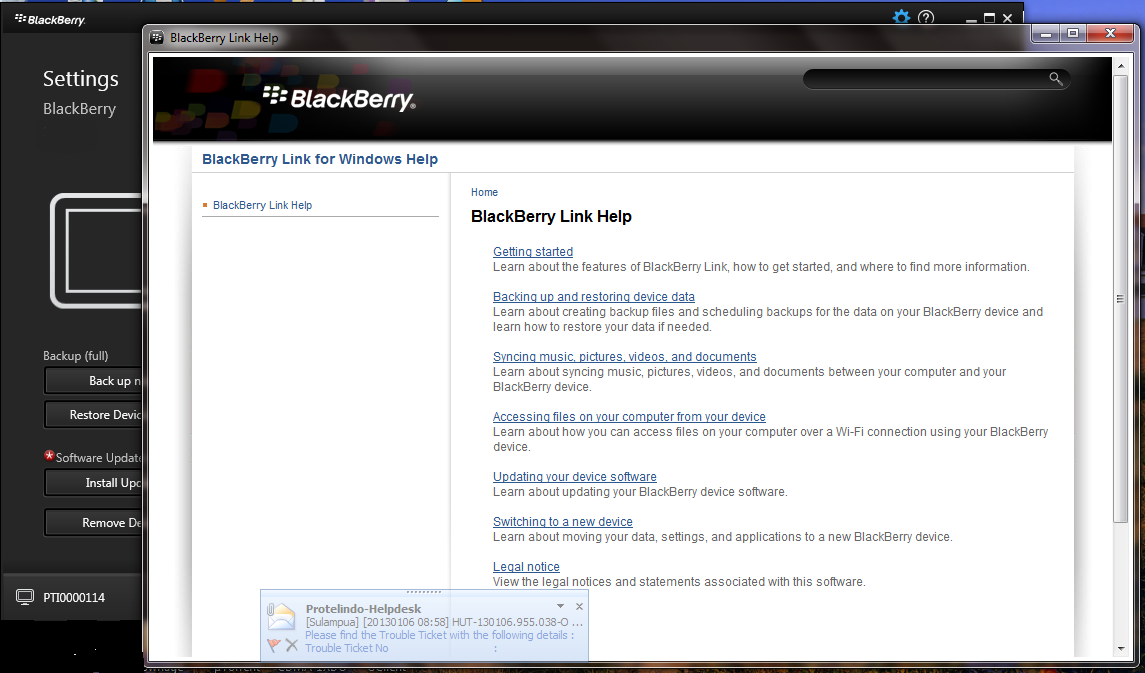
Blackberry Link for Windows
Blackberry Link is a Desktop Manager too, but with better visual from previous version. If I can say, this software is look like i-Tunes for Apple but without any capabilities to buy and install application into our Blackberry Handset.
So, please enjoy yourself to see The Blackberry Link for Windows Version.
Blackberry Link Setup
Add to Cart View detail
Sabtu, 29 Desember 2012
Penampakan X10 aka N Series aka Rev C
Jika kemarin saya posting mengenai L Series atau Z10, maka hari ini kembali saya temukan foto - foto dari BlackBerry 10 dengan keyboard fisik yang biasa disebut N SERIES atau X10.
Foto - foto tersebut saya dapat dari N4BB website. Kalo kita lihat secara seksama, sepintas X10 mirip dengan blackberry 9900 atau Dakota. Namun dengan layar yang lebih besar.
Walaupun bisa dibilang menarik, namun sepertinya RIM punya PR yang harus dikerjakan, yaitu layout dan besar icon yang harus disesuaikan dengan besar layar dari X10.
Dan juga untuk tampilan fisik dari X10 itu sendiri. Mudah - mudahan X10 yang akan dipasarkan akan lebih baik dari di dalam foto - foto berikut.
Senin, 24 Desember 2012
Line Up of Blackberry 10
Baru-baru ini di Crackberry, sesorang memposting foto line up Blackberry 10 terbaru. Ada 3 Blackberry 10 handset di dalamnya.
Di tengah, mungkin sebagian kita sudah sering melihat penampakannya secara Online, yaitu London atau Blackberry L Series, atau Blackberry Z10.
Yang paling kanan, biasa disebut Blackberry N Series atau X10.
Sedangkan yang paling kiri, disinyalir sebagai Blackberry Alpha Dev Rev C atau R Series.
Untuk L dan N series, sepertinya Blackberry jenis ini akan mengisi pangsa pasar smartphone high end.
Sedangkan untuk R Series sepertinya diposisikan sebagai pengganti keluarga Curve pada seri Blackberry sebelumnya.
Add to Cart View detail